Enterprise · Part of Telephony and CTI
Zoom Contact Center
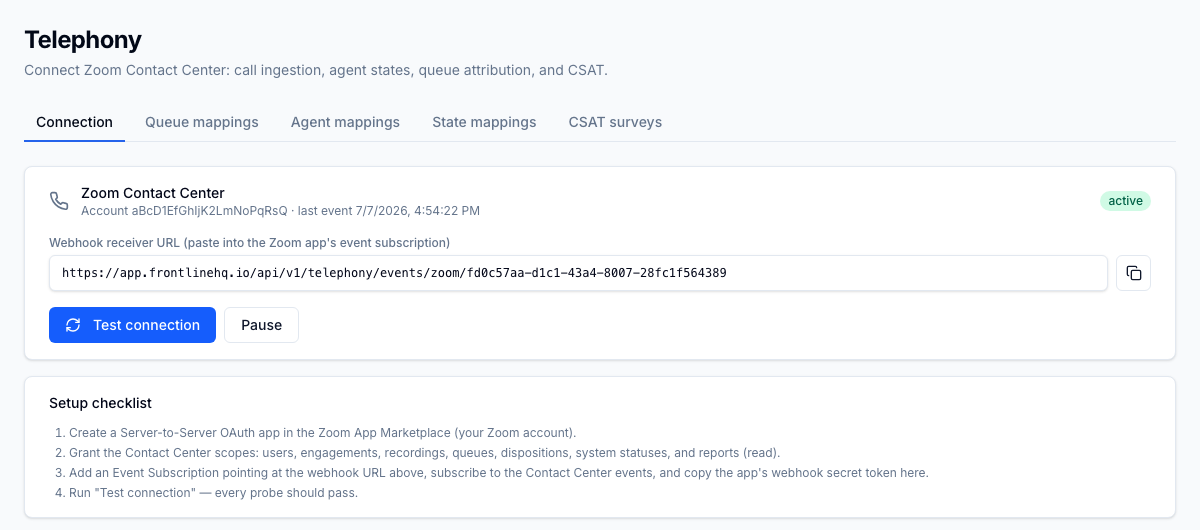
Zoom Contact Center is FrontLine's first live telephony adapter. A tenant admin connects a Zoom Server-to-Server OAuth app, and FrontLine ingests contact centre engagements through a signed webhook, mapping Zoom queues, agents, and states into the platform.
For the operator
You set up the connection once under Settings > Telephony: paste the Zoom account id, client id, client secret, and webhook secret, then run a per-capability Test connection probe to confirm every required scope is granted. Secrets are encrypted at rest and never displayed again, so no plaintext credential sits in a config screen. From there you map Zoom queues, agents, and states to their FrontLine equivalents and wire up CSAT (Customer Satisfaction: a post-interaction score for how satisfied a customer was.) surveys, each on its own tab. If you need to take the feed down for maintenance, you can pause and resume it, and every config change happens inside an MFA-verified session. The signed webhook receiver validates each x-zm-signature, handles Zoom's URL challenge, dedupes repeat deliveries, and routes each engagement to the right tenant.
Business impact
Zoom Contact Center goes live without a rip-and-replace: you keep your existing Zoom account and your own OAuth app, so there is no new phone system to procure or migrate. Because credentials are encrypted at rest and config changes require an MFA-verified session, you reduce the audit and access-control risk that comes with wiring a voice platform into your workforce data. The signed webhook path, with signature validation, dedupe, and tenant routing, keeps engagement data accurate and routed to the correct tenant, which matters when you report call activity back to the brands you support. This is also the first adapter in an extensible framework the other platforms will reuse, so the integration work you do here is the pattern every future telephony connection follows.