Growth · Part of CSAT
Survey trigger rules
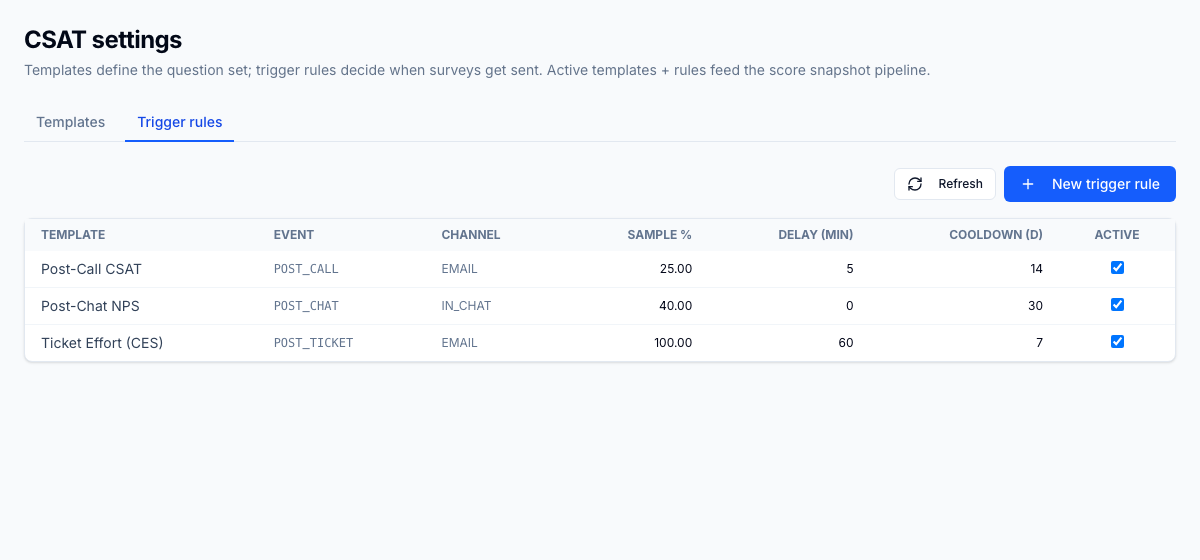
Survey trigger rules decide exactly when a CSAT (Customer Satisfaction: a post-interaction score for how satisfied a customer was.) survey fires and to whom. For each event type (post-call, post-chat, post-ticket) you choose which template sends, a sampling percentage so you do not survey every interaction, a delay before sending, a per-customer cooldown, and an eligible-disposition filter that limits surveys to certain outcomes. Everything is configured under Settings > CSAT.
For the operator
You open Settings > CSAT and add a trigger rule for each event you want to measure: post-call, post-chat, or post-ticket. On each rule you pick the template that fires, then set a sampling percentage so, say, only 30 percent of calls draw a survey. You add a delay so the survey lands a few minutes after the interaction closes, and a per-customer cooldown so the same customer is not surveyed twice in a short window. The eligible-disposition filter lets you survey only the outcomes that matter, for example resolved tickets but not misdirected calls. Save the rule and the pipeline starts sampling live interactions against it.
Business impact
Because rules are set per event and per template, each client and LOB (Line of Business: a distinct client program or queue within an operation.) gets its own sampling cadence instead of one blunt survey-everyone policy. Sampling and cooldown keep survey fatigue down, which protects response rates and the credibility of the scores you defend to clients. Disposition filtering means you only measure the outcomes a client actually owns, so CSAT attribution stays clean per client and LOB. Tuning survey volume in-product removes the need for a separate survey tool and its per-response billing. The result is defensible, client-specific CSAT that supervisors can trust when they coach.